Can You Convert JPG to RAW? Here's What Actually Works
This is one of those searches where the honest answer matters more than the quick one. If software is asking for a RAW file and all you have is a JPG, it's worth understanding exactly what a JPG-to-RAW conversion can and can't give you before you spend time on it.
What "RAW" Actually Means
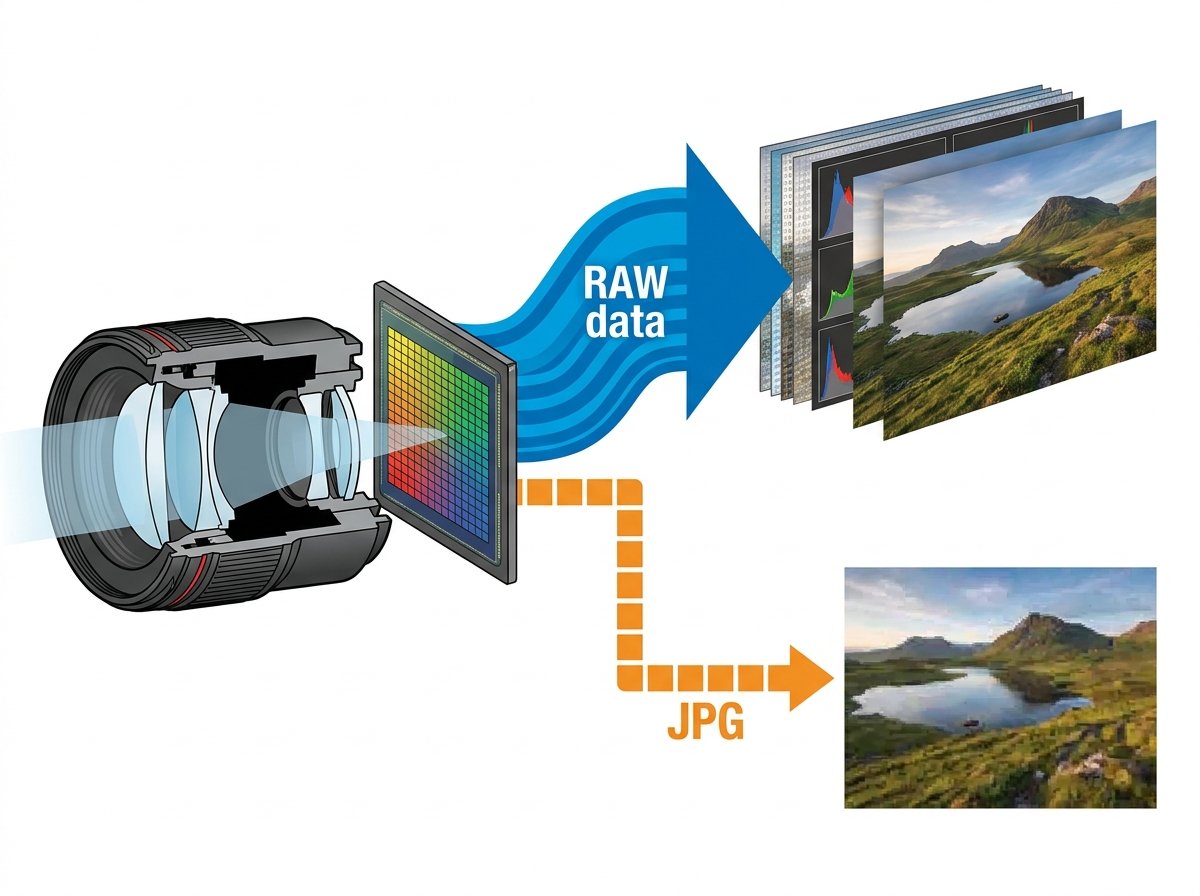
Camera RAW isn't really an image format in the traditional sense — it's a direct, minimally processed dump of the data captured by a camera's image sensor, before the camera's internal processor applies demosaicing, white balance, sharpening, and compression to turn it into a viewable image like a JPG. Every camera manufacturer has its own proprietary RAW format (Canon's .CR2/.CR3, Nikon's .NEF, Sony's .ARW, and so on), and that raw sensor data simply doesn't exist anymore once a JPG has been generated from it.
The Honest Answer: You Can't Recover True RAW Data From a JPG
A JPG is the end result of a camera (or software) already processing and compressing the original sensor data, then discarding it. That processing is lossy and irreversible — color correction has been baked in, dynamic range has been compressed, and the file has been through JPG's lossy compression algorithm, which permanently discards image information to reduce file size.
There is no software, converter, or algorithm that can reconstruct the original sensor data from a JPG, because that data was deleted the moment the JPG was created. Any tool claiming to "convert JPG to RAW" is either producing a RAW-formatted container holding the already-processed JPG pixel data, or applying an algorithm to approximate RAW-like flexibility — not recovering genuine unprocessed sensor information.
What a JPG-to-RAW Converter Actually Does
When a piece of software or an online converter offers to turn a JPG into a RAW-compatible file, it's typically doing one of two things:
- Wrapping the JPG's pixel data in a RAW-compatible container format (like DNG), so software that specifically requires a RAW file extension will accept it — even though the underlying image data is still the processed JPG data.
- Converting the file for compatibility purposes with a workflow, cataloging system, or piece of software that expects RAW files specifically, without claiming to restore lost sensor detail.
This is genuinely useful in specific situations — like when a photo management system or archive requires all files to be in a RAW-compatible format for consistency — but it will not give you the editing flexibility (recovering blown highlights, extending dynamic range, adjusting white balance without quality loss) that a real camera RAW file provides.
How to Convert a JPG to a RAW-Compatible File Online
If you need a JPG wrapped in a RAW-compatible format for software compatibility, an online JPG to RAW converter can generate that file:
- Upload your JPG file.
- Select RAW (or DNG, depending on the tool) as the output.
- Convert the file.
- Download the resulting file for use in your workflow or software.
What You Should Do Instead, Depending on Your Goal
| Your Goal | What Actually Helps |
|---|---|
| Software requires a RAW-formatted file | Use a JPG-to-RAW container converter (what this tool does) |
| Need more editing flexibility for a shot you already took | Nothing recovers this after the fact — shoot in RAW next time if your camera supports it |
| Need to recover detail in blown highlights/shadows | Not possible from a JPG — this data was already discarded |
| Need consistent file formats across a photo archive | A JPG-to-RAW-container conversion is a reasonable solution |
Frequently Asked Questions
Can I get RAW-quality editing flexibility from a converted JPG?
No. The dynamic range and detail that camera RAW files preserve is captured directly by the sensor before JPG compression. Once a JPG exists, that original data is gone and can't be recovered through conversion.
Then why do JPG-to-RAW converters exist?
They're useful for software or workflow compatibility — some cataloging systems, archives, or specialized programs require files in a RAW-compatible format (like DNG) regardless of the underlying image quality.
What's the difference between RAW and DNG?
DNG (Digital Negative) is Adobe's open, standardized RAW format, created partly to solve the fragmentation caused by every camera manufacturer using a different proprietary RAW format. A converter can wrap JPG data in a DNG container even though it isn't a "true" camera RAW capture.
Should I shoot in RAW instead of JPG if I want editing flexibility?
Yes — if your camera supports it, shooting in RAW captures the full sensor data upfront, giving you far more room to adjust exposure, white balance, and highlights/shadows in post-processing than a JPG ever will.
Is converting JPG to RAW free online?
Yes — a tool like the one on hashamismm.online can generate a RAW-compatible file from your JPG for free.
Convert Your File
If you need your JPG in a RAW-compatible container for software or workflow requirements, you can generate one directly. Use the free online JPG to RAW converter — just keep in mind it packages your existing image data rather than recovering lost sensor detail.